Video to Live Photo
Turn a selected video into a Live Photo and save the result to Photos.
 freoza.
LIVEFORM / A FREOZA APP
Turn a video moment into a Live Photo, choose its cover, and save it to Photos. For a favorite travel clip, a short sports moment, or a Live Photo to keep in your library.
For iPhone · iOS 16 or later
See the app and App Store for pricing, free allowances and purchase options.
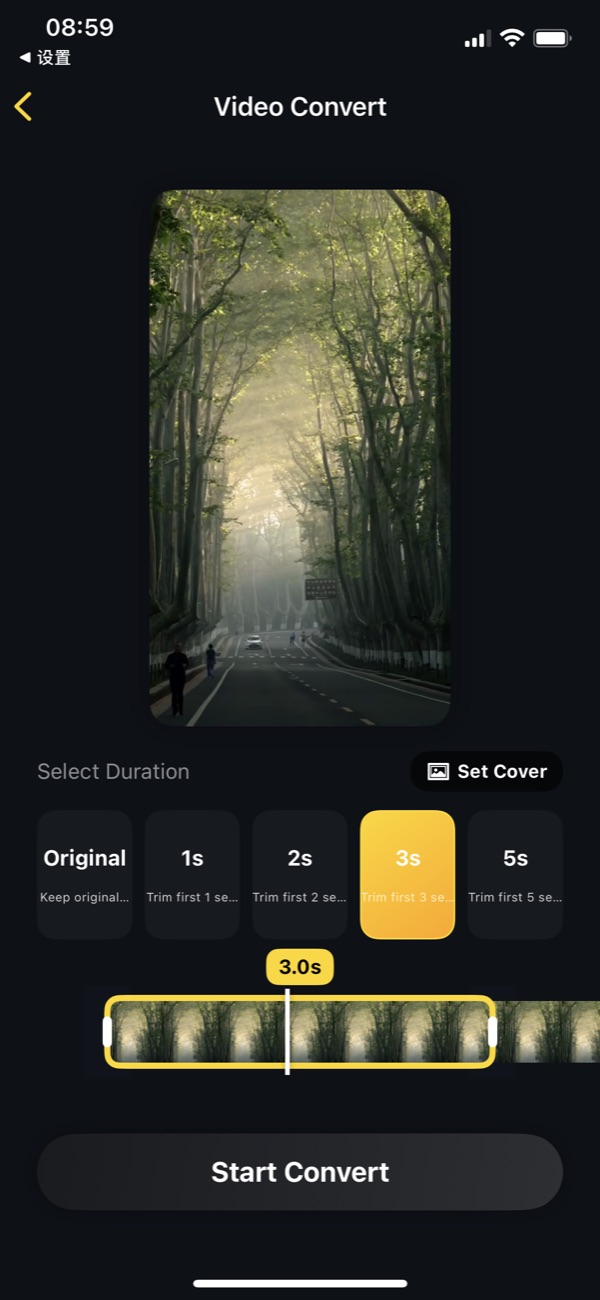
Turn a selected video into a Live Photo and save the result to Photos.
Select a short duration, trim your clip, and choose the cover frame.
Batch conversion lets you work with several videos in one workflow.
Choose the source clip you want to turn into a Live Photo.
Adjust duration and cover. Preview the selected section before converting.
Save the result to Photos and check its motion there before sharing or setting a wallpaper.
FAQ
No universal wallpaper guarantee is possible. Lock Screen animation depends on your iOS version, device and the exported Live Photo. Check playback in Photos first, then check the wallpaper preview.
The receiving app determines how it handles a Live Photo. Some sharing workflows keep only a still image. Check what the recipient receives.
The current app includes Pro access for unlimited exports, trimming and wallpaper conversion, plus an ad-free experience. Free allowances can change through app configuration; check the offer shown in the app.
Privacy policy · Version, pricing & privacy on the App Store
Product information checked:
Liveform
Choose a moment, set a cover, and check the saved Live Photo in Photos.
Liveform
Separate conversion, Photos playback and Lock Screen playback to find where the problem starts.
LIVEFORM
For a favorite travel clip, a short sports moment, or a Live Photo to keep in your library.
Download on the App Store
Compress videos to a target size, split long recordings, and merge clips on your iPhone.

Bring Live Photos, videos, and still images together in a moving collage.